
 Syspirit

Before, deploying a new service at home looked like this: log into my Proxmox interface, clone a VM from my custom Debian template, set the IP, SSH in, write the docker-compose, set up the host in my Nginx Proxy Manager, push the DNS entry to Pi-Hole… In short, a bit tedious.
I had already thought about getting myself to build a clean Terraform template, Ansible-ize everything and script the whole process to make my life easier. But I hadn’t found the time yet when Anthropic released its Telegram plugin for Claude Code. And then everything got a lot simpler…
Lying on my couch, I can just send a Telegram message from my iPhone, something like: “Deploy Homepage in a container, expose it on home.syspirit.fr and fill it with all the services I self-host.”
A few minutes later, Claude tells me it’s done and it’s UP.
Today I’m going to explain how I set all this up, what it can do, and above all the guardrails I put around it.
The idea
The principle is simple: run Claude Code permanently in my homelab, give it the SSH keys to my infra, and plug a Telegram bot in front of it so I can talk to it from anywhere. My phone becomes a remote control for my whole lab.
This is no longer “the AI that answers questions”, it’s the AI that acts on my machines, with its own access.
The architecture
iPhone (Telegram) → Telegram bot → Claude Code (Proxmox LXC)
                                        │
                                        ▼
                                 SSH keys to the infra
                                 (Proxmox host, VMs, NPM, Pi-Hole)
In practice:
- A dedicated Debian LXC on my Proxmox, with a
claude-agentuser reserved for it. - Claude Code installed inside and set up as a
serviceso it survives disconnections. This isn’t about comfort: messages only land in an open session, so you need a process running at all times. Using tmux works too. - The official Telegram plugin (
/plugin install telegram@claude-plugins-official), set up with a bot created through BotFather. It runs on Bun, which you need to install first. - A Telegram allowlist so only my account can talk to the bot.
The plugin is part of channels, a research preview feature that lets you push events into a running Claude Code session. You start the session with the right flag:
claude --channels plugin:telegram@claude-plugins-officialThe LXC has SSH keys deployed to the machines I want to drive. I generated a key pair dedicated to claude-agent rather than reusing my personal keys: if I want to cut its access, I revoke a single key, without touching mine.
And above all, I gave it an inventory: the list of servers it is allowed to connect to, each one with its role, its IP and the user to use. That’s what makes the difference between an agent that gropes around and an agent that knows where to go.
What I actually have it do
A few real examples, taken from my daily use:
- “Create a Debian 13 VM on Proxmox with 4 GB of RAM.” It SSHs into the host, runs a
qm clonefrom my template, boots the VM, waits for the DHCP IP and hands it to me. - “Install Uptime Kuma in a Docker container on it.” It SSHs into the VM, writes the
docker-compose.yml, runsdocker compose up -d. - “Expose the service on uptime.syspirit.fr.” It SSHs into the Nginx Proxy Manager VM, creates the proxy host, requests the Let’s Encrypt certificate, and pushes the DNS entry to Pi-Hole.
- “Write me a markdown note about what we just deployed.” It gives me a clean doc, ready to file in Obsidian.
- “Take a look around the Proxmox and write me a report on the server resources: CPU/RAM/SWAP/Storage.” It connects to the Proxmox, pulls the data it needs, digs in if something looks off, and writes me a full report.
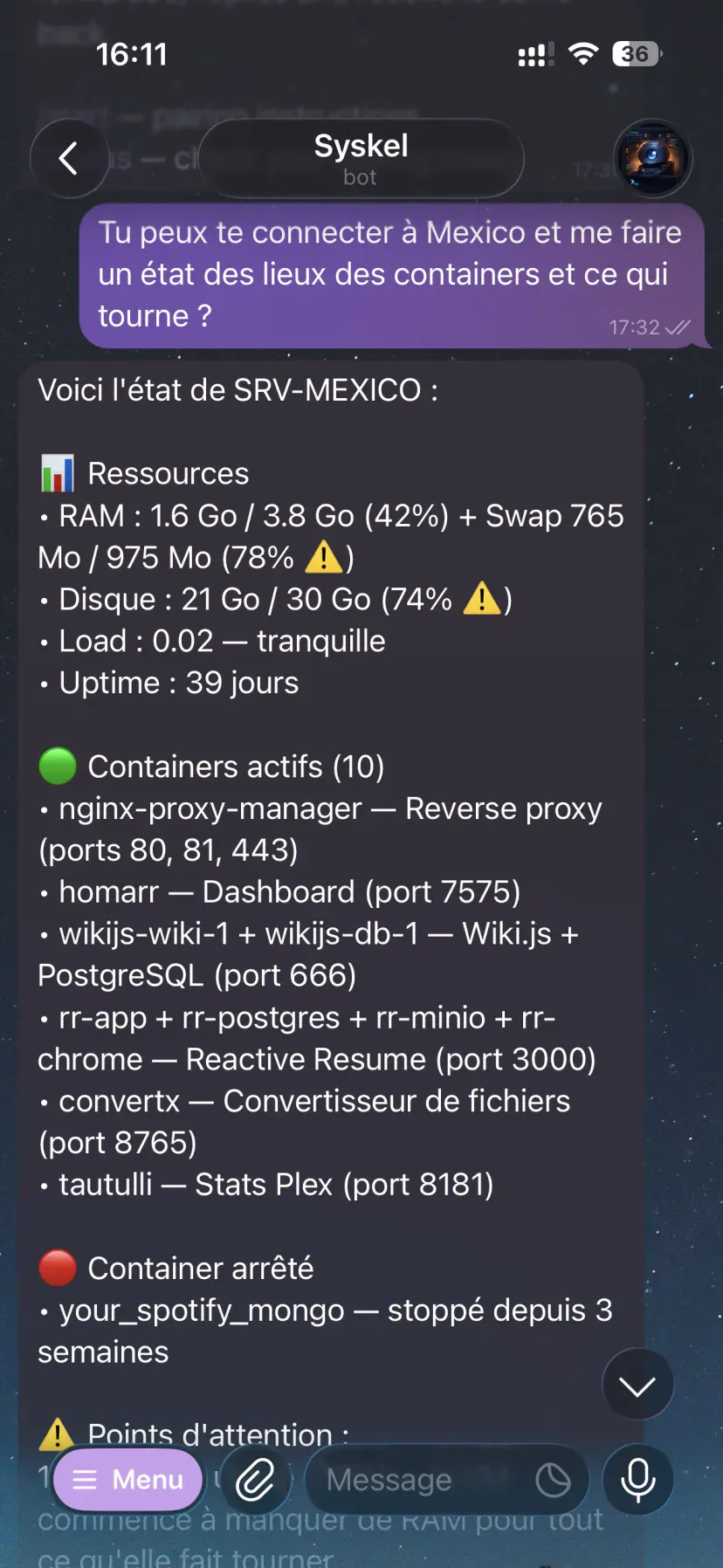
Basically, everything I used to do by hand. Except I don’t touch a keyboard anymore.
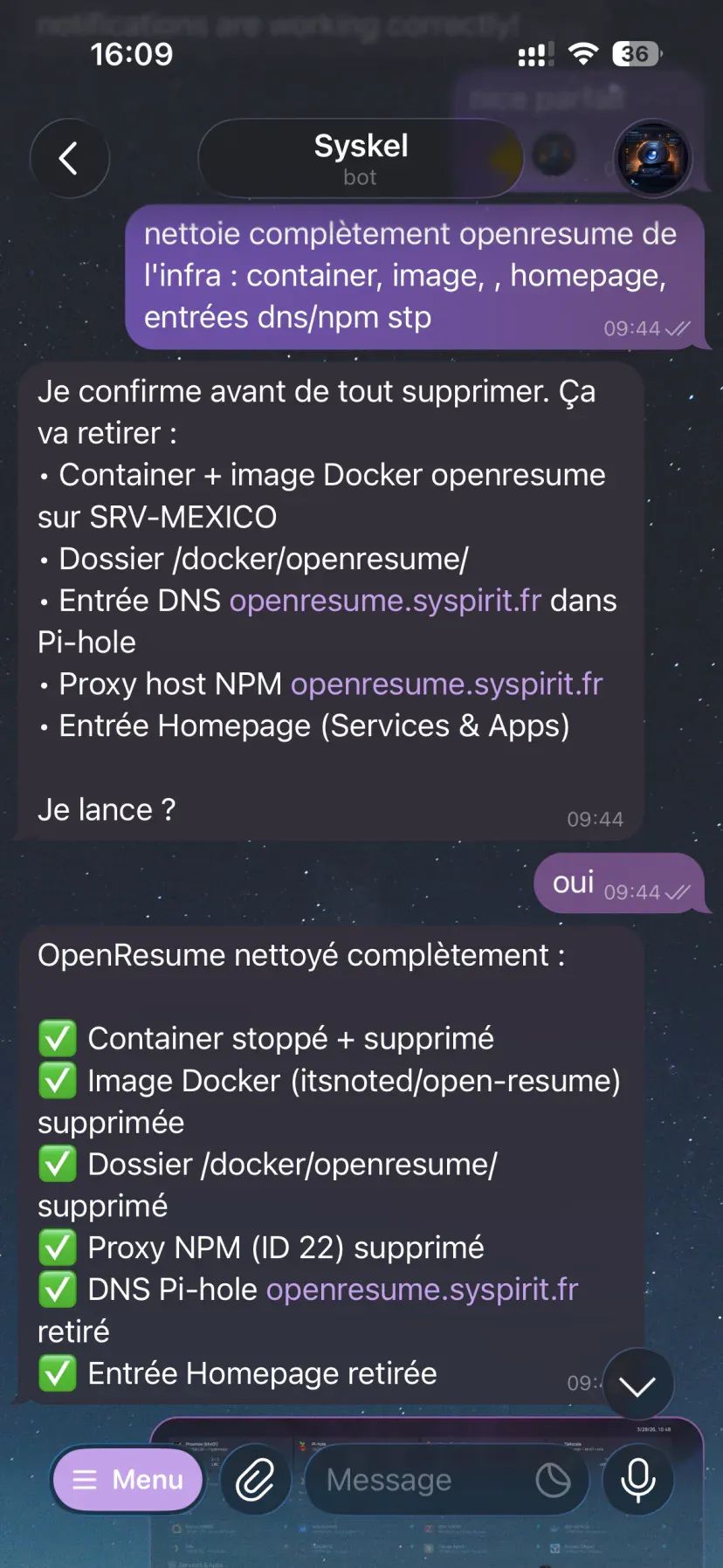
Cleanup works as well as deployment: before deleting anything, it lists what it’s about to remove and waits for my green light. It often asks for confirmation, but nothing forces it to. It’s the model choosing to be careful, not the system making it, and that’s exactly why the permission relay I talk about in the conclusion interests me.
Another use case I find pretty impressive: “Every 2 days, scan the job boards you can reach, pull the ones matching my criteria, give them a score and send me the top 5 in HTML, with the details and the reasoning behind each pick.”
It wrote the script, hooked it to a cron, and I get my report every two days.
Why it’s a real change
Beyond the demo effect, four things changed my daily life:
- Speed. A 30-minute task becomes 30 seconds of chat. It removes the friction that made me put off deployments.
- Automatic docs. I can ask it to document what we just did, and I get a linked note in my vault with no effort.
- Learning. It comments on what it does, so I come across commands or options I didn’t know about.
- Availability. On a train, traveling, at a restaurant, I can work on my infra from my phone.
The guardrails
Giving broad SSH access to an AI deserves some thought. Here’s what I put in place:
-
Dedicated, revocable SSH key.
claude-agenthas its own key pair. The day I want to cut its access, I revoke that key, and nothing of mine moves. -
Telegram allowlist. By default the bot is in
pairingmode: it answers a stranger with a pairing code. I switched to a strict allowlist, where any message from an unauthorized account is dropped without a reply:/telegram:access policy allowlist /telegram:access allow <my_user_id>This is the most important point on the security side. An unfiltered channel is a way in for prompt injection: anyone able to write to the bot puts text in front of Claude, who has a shell.
-
No secrets in prompts. Passwords and tokens live in
.envfiles on the VMs, never in the chat. -
Regular backups (I use Zerobyte if you’re interested 😁). In case it does something stupid, I can roll back.
The limits (let’s talk about them)
I’m not going to sell this as magic, there are a few downsides:
- It starts with
--dangerously-skip-permissions. As the name says, it’s dangerous. Acceptable in a homelab where I take the risk and have backups, unacceptable in production. - Let’s say it plainly: Claude has root access on my infra. A
qm cloneon the Proxmox host or adocker composeon a VM require it. Combined with the flag above, that means it can do anything, including breaking everything, without a single prompt to stop it. That’s the price of the smooth experience, and it’s a price I only accept at home. - Messages sent while the bot is down are lost. Managing Claude’s memory properly matters.
- The AI can get subtle things wrong: a wrong IP, a port, some YAML syntax, the wrong SSH key. You have to read what it does and guide it clearly.
- It’s a research preview. The
--channelsflag and the channels contract can move from one version to the next.
What I take away
This is easily my best homelab upgrade of the year. Not because it’s impressive in a demo, but because it removed the friction that made me put off half my projects.
I honestly think this pattern (an AI with shell access, driven from a chat) is going to become standard on the ops side within a year or two (if it isn’t already…). The real work is getting out of --dangerously-skip-permissions to make it usable in production: sandboxing, precise scopes, audit log, human validation on sensitive actions.
And on that last point, things have already moved without me noticing. While preparing this article, I found out that the Telegram plugin can relay permission requests: when Claude wants to run a command, the authorization prompt lands on my phone with a short ID, and I answer yes or no to approve or refuse it remotely. It’s documented on the channels side and clearly present in the plugin code, starting with Claude Code v2.1.81. It only covers tool calls (Bash, Write, Edit), but it’s exactly what was missing to drop the dangerous flag.
Either way, for a homelab, today, it already holds up just fine. And honestly, driving my infra from my couch, I’m not going back.