
 Syspirit
The Starting Point
Since I finished my blog, Claude Code has also been helping me write my articles. But I wanted to push the tool much further. And the timing was right: I had a problem that had been bugging me for a while. When I’m on the computer, I often need to quickly jot down an idea or a piece of info without opening Google Keep or Apple Notes. I use Obsidian daily but I was cluttering it with small throwaway notes that didn’t belong there.
What I find annoying with most note apps? Too much friction. Tons of menus, features I’ll never use. I just wanted something simple, fast, that does what I ask and nothing more.
That’s how Onyka was born, quite naturally. Yet another note app, but built to meet my exact needs. The twist: I’m not a developer and I’ve never done this before. Everything was built through vibe coding, 100% with AI.
What is Vibe Coding?
The term was popularized by Andrej Karpathy (OpenAI co-founder) in early 2025. The idea is simple: you describe what you want in plain language, and AI writes the code. You don’t code, you steer. You give a direction, validate the result, and course-correct when needed.
In practice, this means someone who has never touched a line of code can build a working application. It’s not magic: you still need to understand what you’re asking for, know how to express your needs, and be able to test what the AI produces. But the technical barrier is incomparably lower than before.
In my case, I used Claude Code for the entire development. I describe a feature, it codes, I test, we iterate. All in the terminal, commit by commit.
The Method
The biggest trap when you don’t know how to code is rushing in head first. I first spent time laying out my idea: what I wanted, how I pictured it, the essential features. A full draft in plain language, nothing technical.
Then I used the project-planner skill that I integrated into Claude Code. It’s a tool that automatically generates a structured project plan: specs, technical design, task breakdown. It gave me a real roadmap. Claude Code then handled each task, one by one, cleanly and while keeping the project context thanks to the generated plan.
For the interface, I added the frontend-design skill which pushes Claude Code to produce more polished and less generic UI components. It really makes a difference to avoid the “AI-generated app” look that you can spot immediately. For the logo, I got my hands into Figma towards the end of the project to try and come up with something decent.
The daily workflow was simple: I launch Claude Code, describe what I want, it suggests, I adjust, we commit. Debug after debug, feature after feature.
What is Onyka?
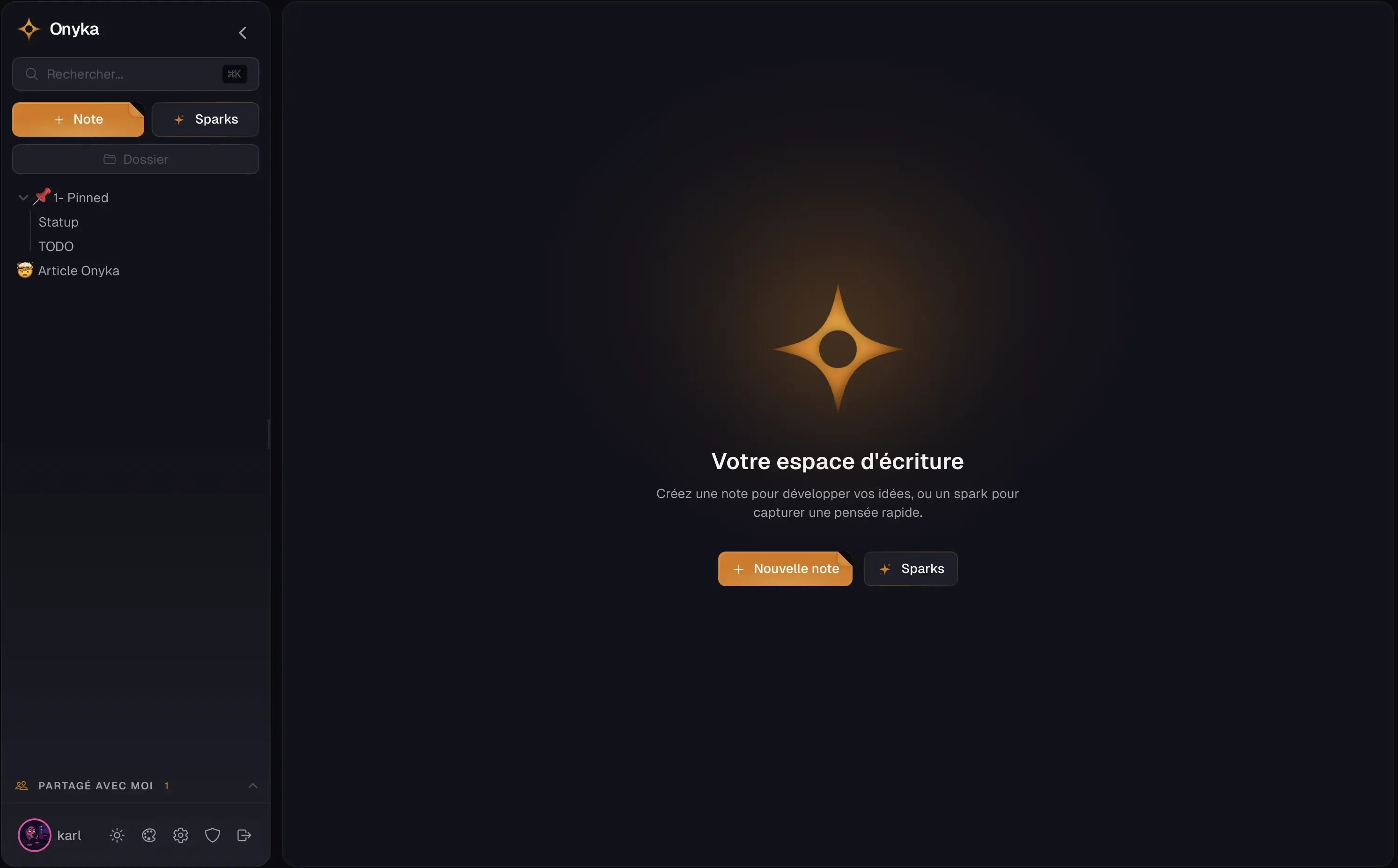
An open-source and self-hostable note-taking application. The idea is to host your own data, no third-party cloud. Here are the main features:
Sparks: this is the game-changing feature for me. You type, you submit, it’s captured. No title, no folder. You set an expiration (1 hour to 30 days) or keep the note permanently. You can pin up to 5 and convert a spark into a full note when it makes sense. The rest disappears on its own.
Rich editor: built on TipTap, with code blocks, tables, columns, images, a slash menu (/) to quickly insert anything, auto-save, and Markdown paste support. Each note can contain multiple pages as tabs.
Real-time collaboration: co-editing via WebSocket like Google Docs, with presence indicators, comments, and three permission levels.
Focus mode: configurable Pomodoro timer, word counter, writing streak tracking, and weekly recap. The sidebar hides for zero distraction.
Customization: I really like personalizing my tools, so I went all in on this. 9 base themes (Dracula, Nord, Tokyo Night, Catppuccin…), 15 accent colors, 12 editor fonts, light/dark mode. The app is also bilingual FR/EN and PWA compatible, so you can install and use it on your phone without going through a store.
The Tech Stack
I’m not a developer, so the stack choice was largely made by the AI. Here’s what’s running under the hood:
| Layer | Technologies |
|---|---|
| Frontend | React 19, Vite 6, Tailwind CSS, Zustand, TipTap 3.19, Framer Motion |
| Backend | Express, Drizzle ORM, SQLite, Socket.io, Zod |
| Security | Argon2 (passwords), JWT, AES-256-GCM encryption, 2FA TOTP, rate limiting |
| Infra | Docker multi-stage, GitHub Actions, Alpine non-root image |
To avoid having an app that looks like every other one, I also pushed the use of libraries that add character: Framer Motion for smooth animations, dnd-kit for drag & drop in the sidebar, a useSmoothCaret hook for an animated cursor in the editor, and 12 @fontsource fonts (Fira Code, Crimson Pro, Space Grotesk…) for varied styles.
The Struggles and Security
Even with Claude Code, I struggled with some features. Drag & drop in the sidebar was a nightmare to get smooth and natural. The editor too: getting a nice feel with TipTap takes a lot of tweaking. And especially Sparks, the core feature, which required tons of iterations to get the behavior I had in mind.
Security is the big sensitive point of vibe coding. When you don’t know how to code, you also don’t know how to spot vulnerabilities. I tried to be as strict as possible: multiple security audits with Claude, CVE analysis of dependencies, AES-256-GCM encryption at rest, Argon2 hashing for passwords, 2FA with TOTP, rate limiting, etc. Is it enough? Honestly, I don’t know. It’s clearly the weak spot of letting AI take the wheel when you don’t have the perspective of an experienced developer.
Going to Production
I pushed to production via a Docker image published on GitHub Container Registry, with a ready-to-use docker-compose.yml. I tried to make the installation as easy as possible while following GitHub and open-source community standards. The app is hosted on my VPS and I use it daily. We’ll see soon enough if it holds up. On my end, I secured the VPS, that’s a bit more my area!
My Mistakes and What I Learned
Let’s be honest, I made quite a few beginner mistakes:
- Spending time on UI/UX when the core features weren’t properly finished. Pretty can wait, functional can’t.
- Wanting a perfect tool from the start instead of daring to ship an MVP, even an imperfect one.
- Wanting too many features all over the place when that’s exactly what I wanted to avoid. I had to cut some along the way.
- Letting the AI pick the stack by default without researching it myself. It’s better to have at least a basic understanding of what you’re using and why.
On the bright side, this project taught me quite a lot: some dev concepts, a much better grasp of GitHub and its ecosystem, and a bit of design with Figma. The whole exercise was really stimulating.
Conclusion
There are probably a few bugs left, I’ll need to use the app longer to find them. But I like the result and it fits my needs, that’s all I was asking for.
If you’re interested, Onyka is available here: github.com/karl-cta/onyka. The app is responsive and PWA compatible, so it works well on mobile too!
Useful links: