
 Syspirit
I’m not the type to run 15 AI agents in parallel. Usually, a single Claude Code terminal is more than enough. But recently, I wanted to try something: opening multiple terminals, each with an agent working on a different task within the same project. The result? After 20 minutes, I had no idea who was doing what, agents were stepping on each other’s files, and I completely lost track. In short, it was a mess.
That’s when I stumbled upon Paperclip, an open-source tool with over 26k stars on GitHub. The idea: orchestrate your AI agents like a real company, with an org chart, budgets, a ticketing system and governance. I tested it, built a team of 8 agents for a side-project, and here’s what I found.
What is Paperclip?
The problem
When you try to make multiple AI agents work together, you quickly run into issues: agents don’t know what the others are doing, they have no memory between sessions, and you have zero visibility on costs.
How it works
Paperclip is a Node.js server (TypeScript) with a React interface that lets you coordinate a team of AI agents. The project is MIT licensed, actively maintained (v0.3.1, 3.5k forks, 350+ open PRs), and the community is growing fast.
It works in 3 steps:
- Define a goal for your AI “company”
- Build the team by creating agents with roles (CEO, CTO, developers, QA…)
- Launch and supervise from a dashboard
Each agent has assigned tasks, a budget, and knows exactly why it’s working. No more conflicts, no more lost context between sessions. And most importantly, you can mix different AIs in the same team: a CEO on Claude Code, a developer on Codex, another on OpenClaw… Paperclip also supports Cursor, Gemini, Bash and HTTP webhooks.
Installation
The quick way
npx paperclipai onboard --yesThis command installs everything automatically, including the embedded database (PGlite). Nothing to configure, the interface is available at http://localhost:3100.
Prerequisites: Node.js 20+ and pnpm 9.15+.
Cloning the repo
git clone https://github.com/paperclipai/paperclip.git
cd paperclip
pnpm install
pnpm devWith Docker Compose
For a more serious setup with PostgreSQL 17:
git clone https://github.com/paperclipai/paperclip.git
cd paperclip

export BETTER_AUTH_SECRET="your_secret_here"
export PAPERCLIP_PUBLIC_URL="http://localhost:3100"

docker-compose up -dWhat I built
To test Paperclip hands-on, I created a “company” for Job-Ctrl, a job application tracker built with Go and TypeScript. All I had to do was define the project goal and create the CEO. At first, he suggested hiring a Founding Engineer and got to work with him. Then I asked him to build a full team: CTO, Tech Lead, developers, QA, etc. He created all the agents, assigned them roles and tasks. As the “board”, I just had to approve the hires.
Looking back, the team is clearly too big and probably poorly structured for a side-project this size. 8 agents for a job tracker is overkill. But that was the point: push the tool to its limits and see what it can do. And on that front, it gives a solid overview of the possibilities.
The interface
Here’s what my team’s org chart looks like in Paperclip:
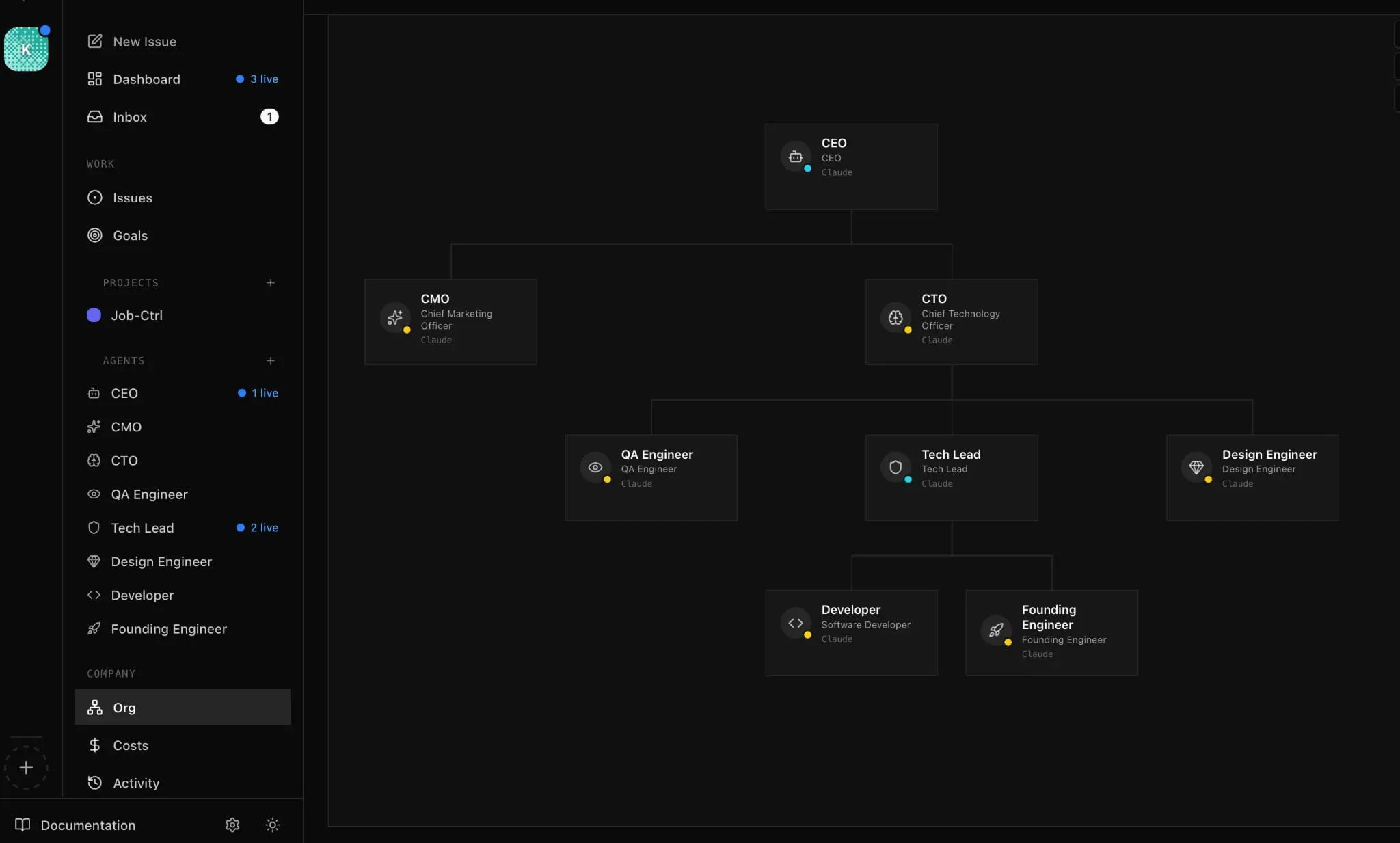
On the left side of the interface, you’ll find the navigation: dashboard, inbox, issues (tickets), goals, the Job-Ctrl project, and the list of all agents with their real-time status. Here you can see 3 agents are “live” (the CEO and Tech Lead among others). At the bottom, the Org, Costs and Activity sections let you manage the org chart, budgets and activity log.
In the center, the interactive org chart shows the full hierarchy. The CEO at the top, CMO and CTO below, then QA Engineer, Tech Lead and Design Engineer under the CTO, and finally Developer and Founding Engineer under the Tech Lead. Each card displays the role, title and agent type (here all running on Claude).
The team in detail
Each agent has its own configuration folder in the project:
agents/
├── ceo/
│   ├── AGENTS.md      # General instructions
│   ├── SOUL.md        # Personality and posture
│   ├── HEARTBEAT.md   # Execution checklist on each wake-up
│   └── memory/        # Persistent memory
├── cto/
├── developer/
└── ...
The CEO’s SOUL.md, for example, defines how he thinks and communicates. The HEARTBEAT.md is the checklist he goes through on each wake-up: read his daily plan, fetch his tasks, delegate to the right agents.
How it works day-to-day
The CEO wakes up on each “heartbeat” (a scheduled cycle) and checks in: what’s in progress, what’s blocked, what needs to be delegated. The CTO translates goals into technical tasks and assigns them through the Tech Lead. The Developer picks up a ticket, codes, tests, and submits for review. QA validates quality.
When an agent picks up a task, no one else can take it. No duplicate work, no conflicts. And each task carries the full history of why it exists, from the business goal down to the ticket. Agents don’t go off track.
At startup, Paperclip automatically gives each agent all the info it needs: who it is, which company it works for, which task is assigned, and why it’s waking up. No need to re-explain context every time.
Roadmap
The project is still young (v0.3.1), but what’s coming looks promising:
- ClipMart: a marketplace to download pre-configured AI company templates. A full org chart in one click, probably the most anticipated feature
- Cloud agents: support for Cursor, e2b and other remote agents
- Plugin system: to add knowledge bases, tracing, queues…
- Simplified configs: making agent setup more accessible
- Better documentation: currently being revamped
Limitations
A few things to keep in mind:
- The project is still in V1: docs are a work in progress and some features are still missing
- It depends on your agents: Paperclip orchestrates, but the quality of results depends on the models behind them (Claude, Codex, etc.)
- It adds up: running multiple agents costs tokens and compute
Conclusion
For someone like me who had never really worked with multiple agents at the same time, Paperclip was a game changer. You go from “I open 5 terminals hoping they don’t step on each other” to something structured where each agent knows what it has to do.
Open-source, self-hosted, MIT license, 26k+ stars and an active community. If you’re starting to juggle multiple AI agents, it’s definitely worth a look!
Useful links: